
Managing School Tour Appointments When Leads Belong to the Same Family: A CRM Design Challenge
In the education sector, managing CRM data is rarely straightforward—especially when the actual decision-makers are parents, and the “customers” (students) often come in groups.
At Flowlytix, we recently explored a complex but common scenario within a K-12 admissions journey:
How should we manage tour appointments in Salesforce when a family has multiple children, each registered as a separate lead, but attending the same school tour together?
Let’s break this down.
The Business Reality
In many K-12 schools, a parent may book a campus tour for more than one child.
Each child is recorded as a separate Lead in Salesforce because they may be applying for different grades, campuses, or entry years.
However, the tour appointment is only made once, with the parent.
This creates a data design tension:
- Should we create multiple tour records—one per Lead?
- Or just one appointment, but lose the connection to each child?
The Data Problem
If the appointment is recorded under only one Lead, we face three critical issues:
- Reporting inaccuracy
- Leads who attended the tour may show no touchpoints in their funnel.
- Tour-to-Enrollment conversion metrics become unreliable.
- Disrupted Journey Mapping
- Engagement scoring and automation may fail due to missing data.
- Operational inefficiency (if we duplicate records)
- Sales teams would have to create the same tour record for each child—introducing redundant work and potential inconsistencies.
The Chosen Solution: A Pragmatic Workaround
To balance data integrity with workflow simplicity, we took the following approach:
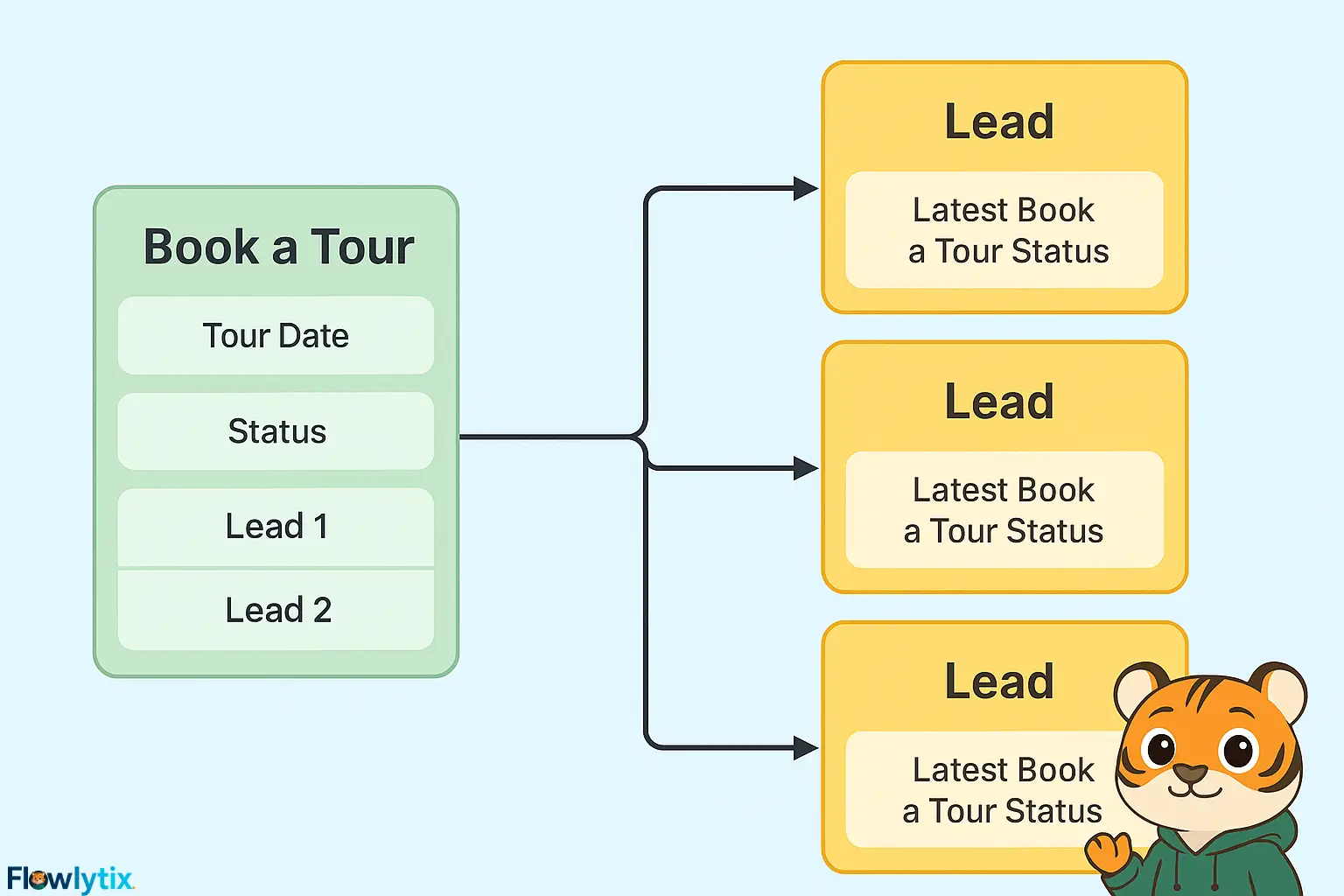
1. Use one Book_a_Tour__c record per appointment (with the parent).
2. Add multiple Lookup fields on the Tour object:
Lead_1__c,Lead_2__c,Lead_3__c- (Enough to accommodate most families.)
3. On each Lead, we added:
Latest Tour DateLatest Tour Status(e.g., Visited, No Show, Declined)
4. Automation via Salesforce Flow:
- When a Tour record is created or updated, the relevant fields on each connected Lead are also updated.
- This ensures each Lead carries a reflection of their tour history, without duplicating the appointment record.
Why This Works
- For reporting:
- Analysts can still measure tour-to-enrollment conversion at the Lead level using the synced fields.
- Power BI and Excel users don’t need to cross-reference tables—they have all key insights within the Lead object.
- For Sales teams:
- No added workload. They manage just one Tour record.
- For long-term CRM health:
- Tour history is still visible in related lists, and data stays clean, consistent, and centralized.
Lesson Learned
This isn’t a perfect solution—but it’s a practical one.
Salesforce doesn’t natively support family-based journeys out of the box. So instead of over-engineering with custom objects or duplicating records, we designed a “mirror sync” pattern—allowing us to track the journey accurately while minimizing complexity.
In CRM design, the best solution is often not the most technically elegant—
It’s the one that respects both how humans actually work and what data needs to do.



This is a really practical CRM solution for a common problem in education. It balances data integrity with user workflow nicely.